Install instructions for an A* working directory
A* working directory
Section titled “A* working directory”This is an A* working directory containing a collection of A* components, e.g
a-tmg or talk-microgrids-alaska. This document is the starting place
for the technical use of A*, in particular:
- Browse A* components.
- Create a new A* working directory.
- Import components from an A* server.
- Build and run components using components.
- How to locally modify components and update components.
This document also links to detailed documents describing the installation process on different platforms.
This document is kept in the a-start-overview component.
Work Instruction
Section titled “Work Instruction”End State: a working A* directory suitable for installation and development.
Preparation:
- Prepare a machine for installation using one of the instructions in
platform-*noting:- Since this will have access consider platform security.
- Confirm that no other users have access.
- For Microsoft confim that there is NO remote backup.
- Install needs to have
gmakeandtclsh8.6installed.
- Consider using a large (~1TiB) external USB drive.
- Ensure you have enough diskspace to install everything. This is around 10GiB as of 2025-11.
Browse A* components
Section titled “Browse A* components”You will need a username/password from a-core to access the component
list with a web browser at http://a-star-microgrid.com/a-team/COMPONENTS/.
This provides a list of all the components, e.g.
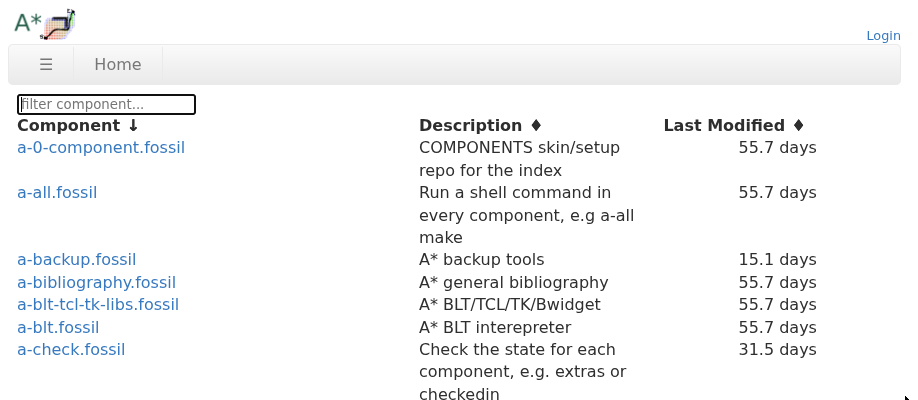
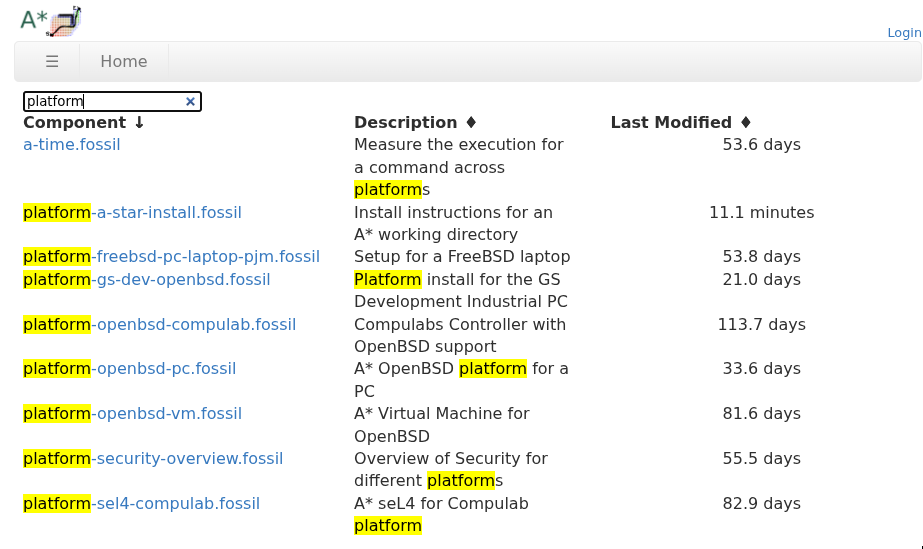
The components are using ’-’ separated keywords and can be searched directly, e.g.
How to create a new A* working directory
Section titled “How to create a new A* working directory”For this example we will use an OpenBSD laptop or embedded controller installed using `platform-openbsd-install. This describes installation a either a laptop, embedded controller or virtual machine.
- Get a username/password pair from
a-core(phil,gavin):
- Username should be the same as the
USERname on the installation target. - A password following xkcd, i.e. 4 or more words. The password
is fixed for this version but can be updated by
a-core. - Note that each user has different permissions/capabilties, e.g.
- Read only
- Project Manager
- Developer
- Admin
- Test the username/password pair on the server by visting the A* component directory in secure web browser. Note that the same password is for access to the site and for each component. Saving these passwords is useful for making it easier.
FILE NOT FOUND: /Users/david/a-team/platform-a-star-install/https:/a-star-microgrid.com/a-team/COMPONENTS
3. fossil needs to be installed locally via your local package manager noting that our the default platform-*-install instructions or images already do this.
4. Update your user system configuration in ~/.bashrc or it equivelant.
export ASTAR=$HOME/a-team
export CDPATH=$ASTAR:.export PATH=$ASTAR/bin:$PATHexport MANPATH=$ASTAR/share/man:$ASTAR/man:/usr/share/man:/usr/X11R6/man:/usr/local/manexport MANPATH=$MANPATH:/usr/local/lib/tcl/tcl8.6/manexport MANPATH=$MANPATH:/usr/local/lib/tcl/tk8.6/manexport LD_LIBRARY_PATH=$ASTAR/lib:$LD_LIBRARY_PATH/lib- Use fossil itself to clone the
a-tool. Replacepjmwith you username.
% fossil clone https://pjm@a-star-microgrid.com/a-team/COMPONENTS/a-clonepassword for https://pjm@a-star-microgrid.com/a-team/COMPONENTS/a-clone:remember password (Y/n)?
Encrypted HTTPS authorization required byhttps://pjm@a-star-microgrid.com/a-team/COMPONENTS/a-cloneUse Fossil username and password (y/N)? yRemember Basic Authorization credentials (Y/n)?Round-trips: 3   Artifacts sent: 0  received: 58Clone done, wire bytes sent: 1489  received: 70521  remote: 59.167.103.184Rebuilding repository meta-data...  100.0% complete...Extra delta compression... none foundVacuuming the database...project-id: 6da19fd7295b877b3c0f9a7f9e004b5a312d180fserver-id:  974071bd9d0ac576213cbeff97e5dabafa8cfb1cadmin-user: pjm (password is "YTnXLGjdu5")opening the new ./a-clone.fossil repository in directory ./a-clone...COPYRIGHTKEYWORDSLICENSEMakefileREADME.mda-clonemain.bibmain.mdproject-name: a-clonerepository:   /home/pjm/a-new/a-clone.fossillocal-root:   /home/pjm/a-new/a-clone/config-db:    /home/pjm/.config/fossil.dbproject-code: 6da19fd7295b877b3c0f9a7f9e004b5a312d180fcheckout:     0fb0a77d500d2d3a9a4fbac23719e032028fc1f2 2025-10-24 09:55:38 UTCparent:       ab83ca92e78c73aac056c74b9b9363bc2038e35f 2025-09-11 05:23:53 UTCtags:         trunkcomment:      Added tclsh version (user: pjm)check-ins:    11
How to import components from an A* server
Section titled “How to import components from an A* server”Components are downloaded with a-clone which
was installed by the previous step.
% ./a-clone a-makepassword for pjm at https://a-star-microgrid.com/a-team/COMPONENTS:Round-trips: 3 Artifacts sent: 0 received: 76Clone done, wire bytes sent: 1202 received: 83487 remote: 59.167.103.184Rebuilding repository meta-data... 0.0% complete... 39.1% complete... 97.8% complete... 100.0% complete...Extra delta compression... none foundVacuuming the database... COPYRIGHTKEYWORDSLICENSEMakefileREADME.mda-makea-make.mkmain.bibmain.mdmanifest.shorttalk.mdproject-name: a-makerepository: /home/pjm/a-new/a-make.fossillocal-root: /home/pjm/a-new/a-make/config-db: /home/pjm/.config/fossil.dbproject-code: 965a3c4f5821e21db66a263dfa127f59091e3be1checkout: 97727249921a1e22aa2b0dd82db9ad8832dfbe58 2025-10-26 22:07:00 UTCparent: 257e62e5b1bc57423314e5633e044bb05f4587cb 2025-10-08 06:59:18 UTCtags: trunkcomment: Added creation of bin,... directories (user: pjm)check-ins: 16project-id: 965a3c4f5821e21db66a263dfa127f59091e3be1server-id: 4e0d919717cf15a1d1715f02ade9dc9102c60ce5admin-user: pjm (password is "Uuex3SCGEb")opening the new ./a-make.fossil repository in directory a-make...Note that a-clone takes a list of glob/wildcards
so that you can download all component licenses using:
% a-clone license-\*Finally the build process for each component will download its components automatically
How to build and run components using components
Section titled “How to build and run components using components”How to modify and update components
Section titled “How to modify and update components”\appendix
Permissions and Capabilities
Section titled “Permissions and Capabilities”Any user with a login can see the names and descriptions for all components.
Each component has its own set of username and permissions which give differing access. These are described in Capabilities and are setup for each user on the server.
The current setup is:
nobody- without a login no accessanonymousreaderdeveloper
Security Notes
Section titled “Security Notes”TBA but mostly about the access to local data and append only. Probably bit abouthow this all compares.
Optional bash settings
Section titled “Optional bash settings”To be reviewed.
export AUTOMAKE_VERSION=1.17export AUTOCONF_VERSION=2.72export EDITOR=mg
alias make=gmake
alias f=fossilalias c="fossil commit"alias d="fossil gdiff"alias u="fossil update"
alias e="emacs"alias w="ungoogle-chromium"alias l="ls"alias sudo="doas"#eval `ssh-agent`
# shell promptcase `whoami` in    root|toor)        PS1="# "        ;;    pjm)        PS1="% "        ;;    *)        PS1="`whoami` % "        ;;esacPS1=`echo -ne "\[\033]0;\\w \\$(ts-status)\007\]\[\033[01;92m\]$PS1\[\033[0m\]"`
FILE NOT FOUND: /Users/david/a-team/platform-a-star-install/SECURITY.md